Free on the web. iPhone app on the way.
Which store near you is actually cheaper?
Type an item. Cartworth prices it at the grocery stores that are really around you, all at the same time, and converts every price to one shared unit so a 12 oz box and a 42 oz canister can be compared honestly.
- Anywhere in the US. Set a ZIP and Cartworth finds the chains that actually have a store near you.
- Every price normalized to per pound, per gallon, per dozen or per count.
- In-store shelf prices and online delivery prices are labeled separately, because they are not the same number.
No account. No sign-up. The web version is free and does the full comparison.
The lowest sticker price here is the worst buy per pound. That is the whole idea.
Illustration, not a screenshot. Example prices, September 2026. Varies by location. Store names are stand-ins.
How it works
One search, every store around you
Three steps, and the first one is the only thing you have to type.
-
Say where you are
Enter a five digit ZIP. On iPhone you can tap once to use your location instead. That is the only thing Cartworth asks you for: no email, no account, no card.
-
It finds the stores that are really there
Cartworth checks which chains publish a weekly circular for your postal code, then asks each of those chains' own sites whether they have a store near you and how far away it is. Nothing is assumed from a list of chain names.
-
It prices your item at all of them at once
Each store's closest real match comes back with its price converted to a shared unit, the distance to that store, and a label saying exactly what kind of number it is: a shelf price, an online listing, a chain-wide price, or a weekly ad price.
Where the prices come from
Nothing crowdsourced. Nothing guessed.
Cartworth reads the prices retailers publish online for the store nearest you. A few chains publish a catalogue on their own site; most publish theirs through Instacart's storefront for that chain, so that is where Cartworth reads them, and it is why many of those prices are labeled online rather than shelf. Weekly ad prices come from the circular service that stores distribute their flyers through. Nothing is crowdsourced, nothing is bought in from a third-party price database, and nothing is estimated from other data.
Shelf price or online price, always labeled
Some retailers publish their in-store shelf prices. Others only publish a delivery listing, which those retailers themselves say can run above the shelf. Cartworth never blends the two. Every price carries its source.
One unit, so sizes compare
A 12 oz box and an 18 oz bag do not line up, which is exactly why the shelf is confusing. Cartworth converts everything to per pound, per gallon, per dozen or per count. When a store lists something only as "each" and a typical weight has to be used, the number is marked as an estimate rather than quietly presented as fact.
Only real matches count
A comparison is worthless if the stores are not showing the same thing. Cartworth matches on what the item actually is, so milk chocolate never wins a search for milk and a store that has no honest match says so instead of filling the row with something close enough.
More than 70 chains, and the ads from more
Cartworth knows how to price more than seventy national and regional grocery chains, from the big nationals down to regional names. Not every chain publishes prices Cartworth can read: a few block automated lookups, and others simply put out a circular and nothing else. For those, Cartworth shows the weekly ad rather than pretending it has prices it does not have.
A guide, not a guarantee
Stores change prices without notice, and published listings can be out of date or plain wrong. Cartworth tells you what each retailer is publishing right now. Check the shelf tag when you get there. Anyone who promises you a guaranteed saving on groceries is guessing.
Cartworth is independent. It is not affiliated with, endorsed by, sponsored by or partnered with any retailer, and it shows no retailer logos or branding. Store names appear as plain text, as a statement of which store a price came from.
Features
Everything the weekly shop actually needs
The comparison is the core. Around it sits the rest of the job: the ads, the list, the trip, and knowing whether today's "sale" is really a sale.
The weekly ad, including the fine print
Browse this week's circulars for the stores near you. "2 for $5", BOGO, digital coupon prices and loyalty card prices all show their conditions: the limit, whether you must buy two, and what the item costs without the coupon.
Price watches and target prices
Track the items you buy often, set the price you would stock up at, and Cartworth keeps checking. The iPhone app tells you when something hits your target or reaches its lowest price yet.
Price history
Every price Cartworth sees for a product you follow is kept, so you can see what it normally costs. A yellow tag on a price that has not moved in four months is not a sale, and the chart says so.
A list that knows what it costs
Add items with a size, like "milk 1 gal", and Cartworth prices that exact amount at every store you follow. The total is not a surprise at the register.
Cheapest trip planning
Once the list is priced, Cartworth works out the cheapest single store, the best two store and three store split, and what the trip would cost if you cherry picked every item at its cheapest store. Then you decide whether the second stop is worth the drive.
Recipe photo to priced list iPhone
Photograph a cookbook page, scan a recipe card or paste a recipe link. The ingredients are pulled out, pantry staples you already own are skipped, and the rest lands on your list with prices. The text recognition and the ingredient parsing both run on the phone.
Favorite brand sale alerts iPhone
Name the brands and ingredients you actually buy. Cartworth checks them against every weekly ad for your stores and tells you when one turns up on sale.
Next week's ads and seasonal guides
Stores post next week's circular days early, and Cartworth shows it as soon as it appears. Ahead of the moments that move grocery prices, from Thanksgiving to back to school, it points you at what is worth buying and when.
Cartworth for iPhone
The personal layer, in your pocket
The website does the comparison for anyone, free. The iPhone app adds the parts that only work on a phone you carry: your location, alerts that arrive while you are not looking, and a camera pointed at a recipe.
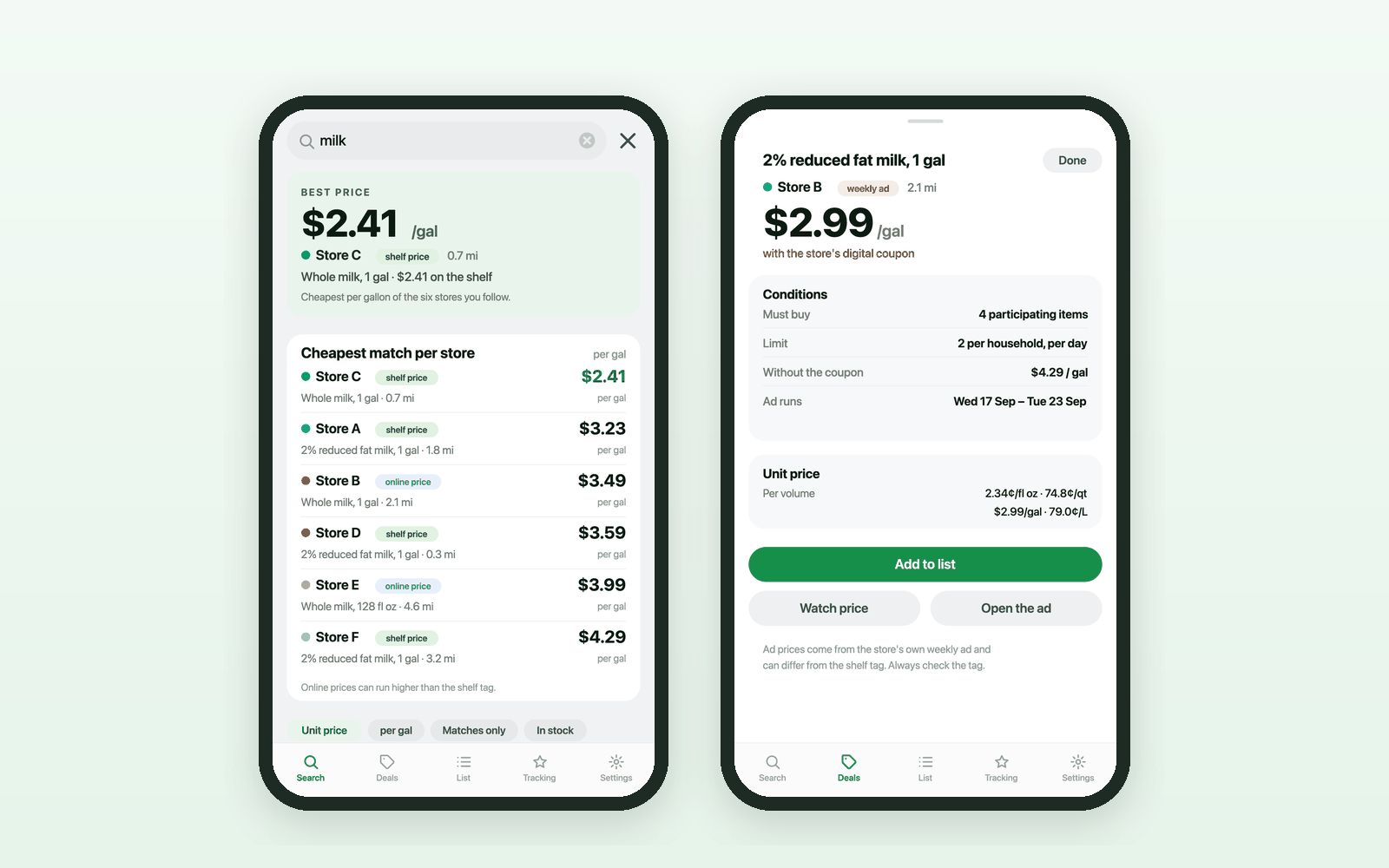
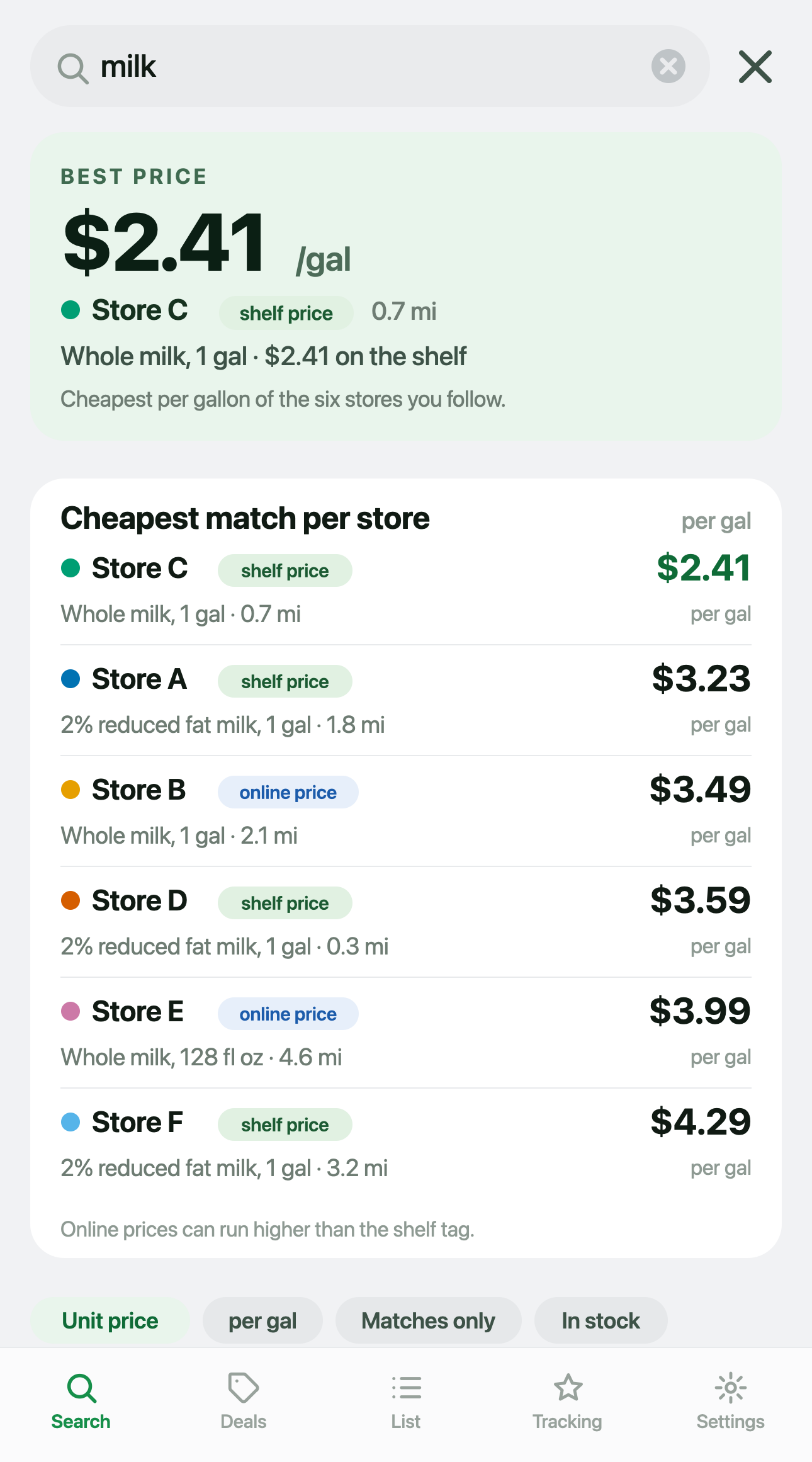
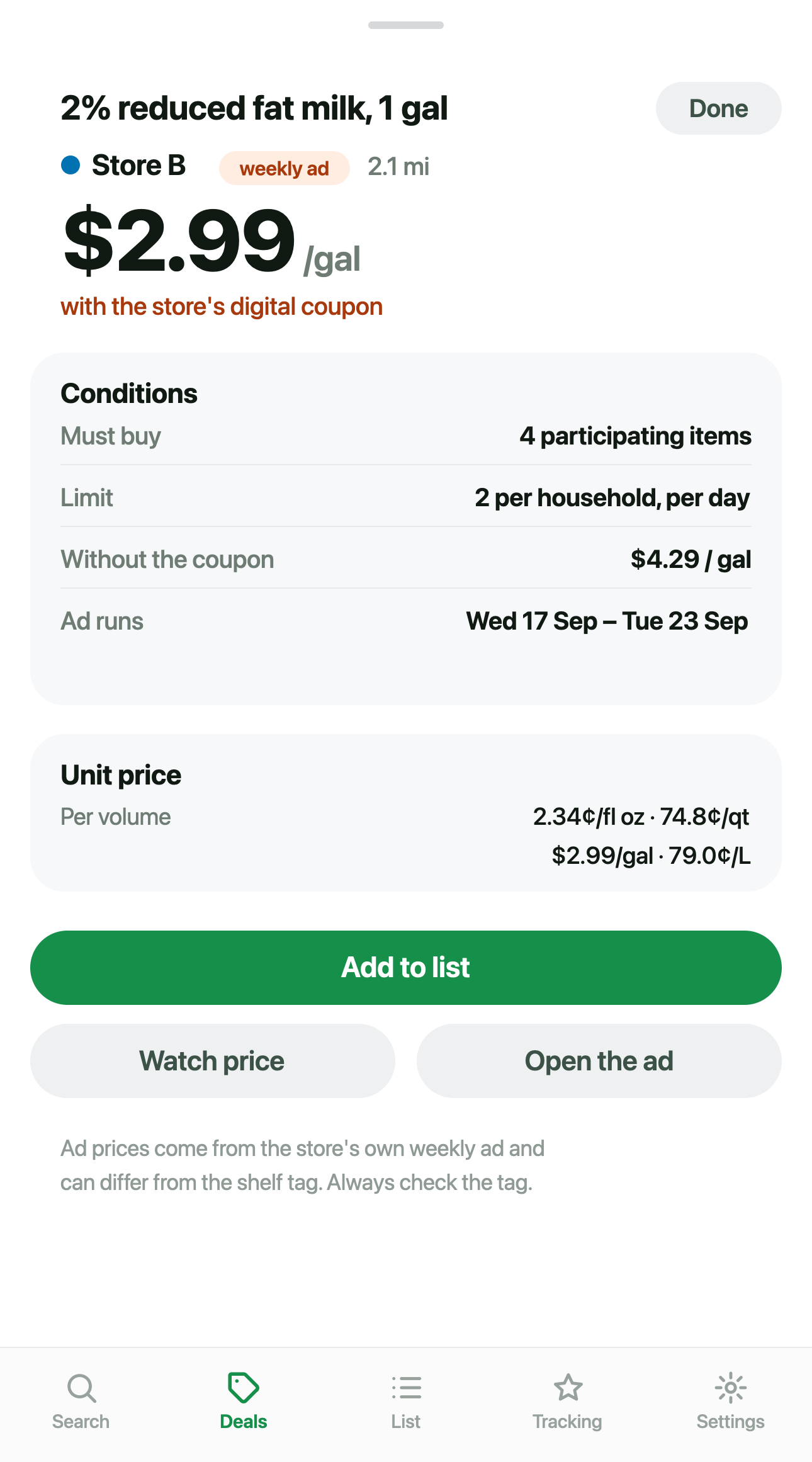
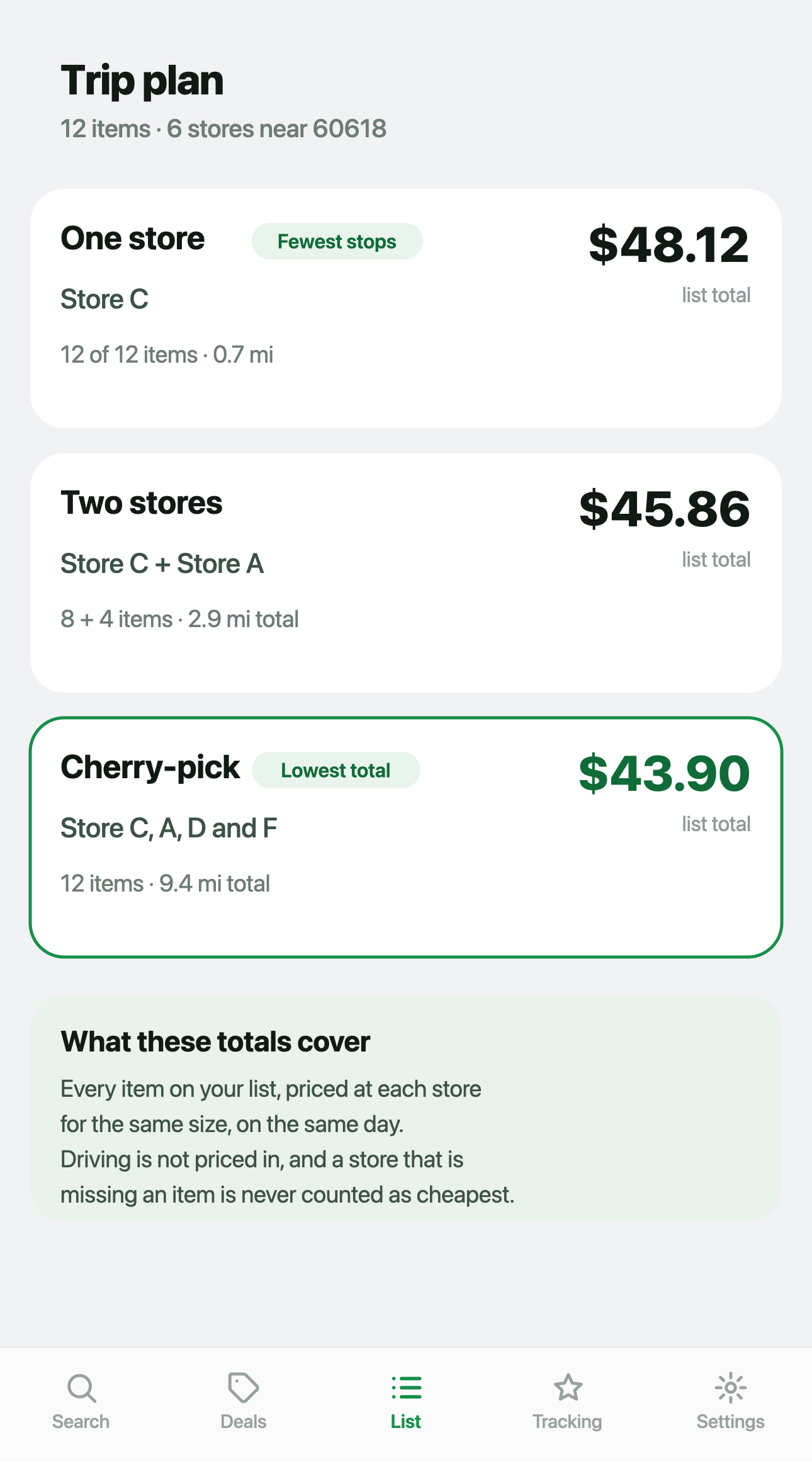
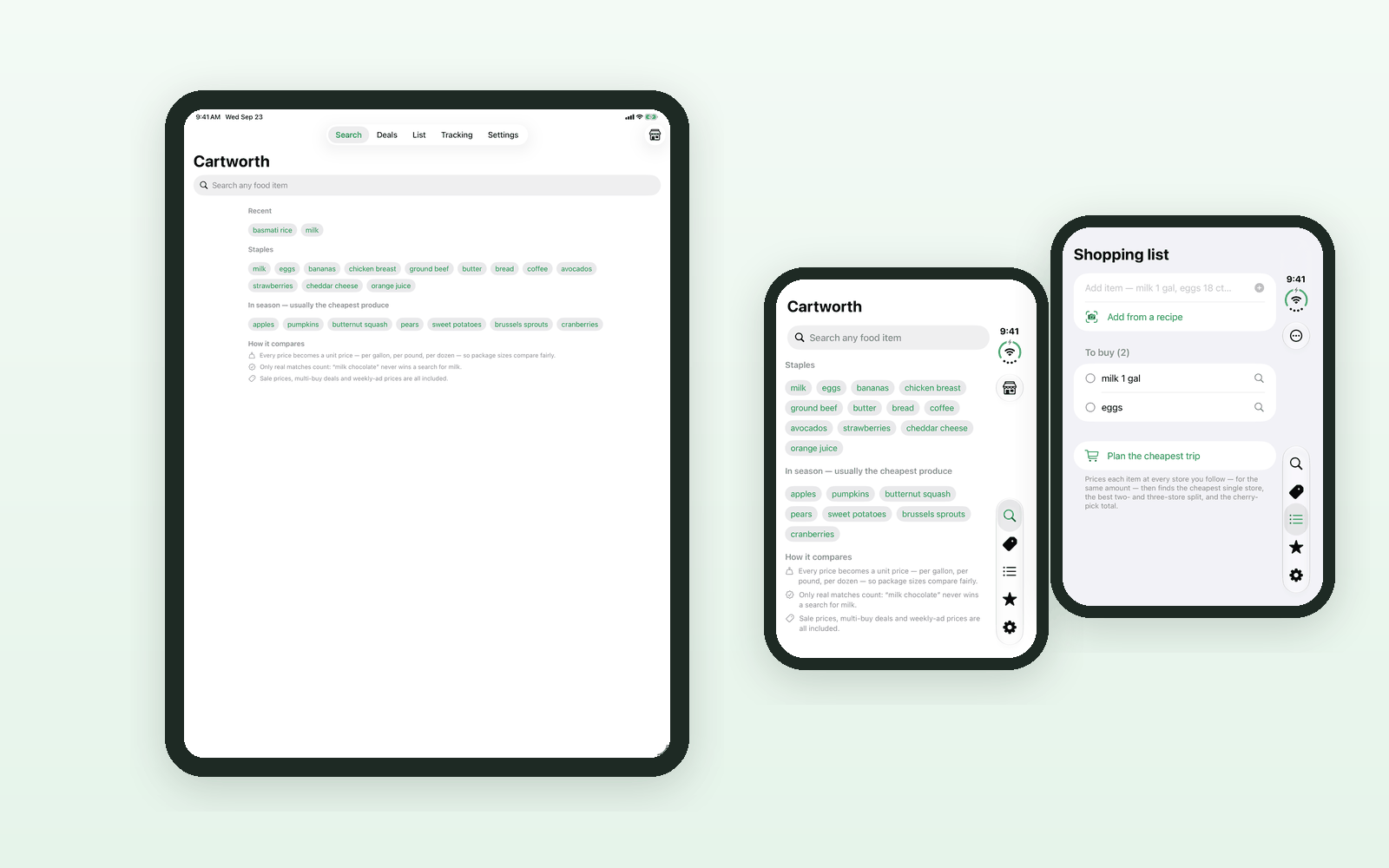
Requires iOS 17 or later. The three phone images above are illustrations of the app in development, not screenshots; the iPad and iPhone Duo image is real screenshots. Example prices, September 2026. Varies by location.
Free web vs paid app
The website is not a demo
Plenty of products put a crippled taster on the web to push you to the paid app. This one does not. The website does the whole comparison, the weekly ads, the watches, the history and the trip planning, free, with unlimited searching and up to 60 price watches. The app is worth paying for because of what a phone can do that a browser tab cannot.
| Feature | cartworth.app free |
iPhone app free + Pro |
|---|---|---|
| Finds the stores near your ZIP | Yes | Yes |
| Use your current location instead of a ZIP | No | Yes |
| Price an item at every store at once | Unlimited | 3 a day free, unlimited with Pro |
| Unit price normalization | Yes | Yes |
| Shelf and online price labels | Yes | Yes |
| This week's ads with their conditions | Yes | Yes |
| Next week's ads as soon as stores post them | Yes | Pro |
| Shopping list priced at each store | Yes | Yes |
| Cheapest trip planning across stores | Yes | Pro |
| Price watches | Up to 60 | 1 free, unlimited with Pro |
| Price history charts | Yes | Pro |
| Alerts when a watched item hits your price | No | Pro |
| Favorite brand sale alerts | No | Pro |
| Recipe photo or link to a priced list | No | Pro |
| Seasonal and holiday shopping guides | No | Yes |
| Account required | Never | Never |
Pricing
Free on the web. Three ways to buy the app.
All three options unlock exactly the same thing. There is no higher tier and nothing else to buy.
The full comparison in any browser, on any device.
- Unlimited searches
- Weekly ads, this week and next
- Watches, history and trip planning
- No account, no card
Everything in the iPhone app, billed every month. Cancel any time.
- Unlimited searches and watches
- Price and favorite brand alerts
- Recipe import, trip planning, history
About $1.67 a month. Renews once a year until you cancel.
- Everything in Pro monthly
- Family Sharing included
A one time purchase, not a subscription. Nothing renews.
- Everything in Pro, permanently
- Family Sharing included
Prices are in US dollars and are the US App Store prices. Subscriptions are billed through your Apple Account and renew automatically until cancelled; you can cancel any time in your Apple Account settings. The free tier of the iPhone app is three searches a day and one price watch, with weekly ads, store discovery and your shopping list included. Full detail is in the terms.
Privacy
There is nothing to sign up for, so there is nothing to leak
No account. No email address. No analytics SDK, no advertising SDK, no tracking, and nothing sold to anybody. Your searches, lists, watches and price history live on your own device.
What does leave your device is the obvious part: to look up a price, your area and your search term reach the retailer's own website. On iPhone that request goes straight from your phone. On the web it is made by our server on your behalf, so the retailer sees the server rather than you. We say so plainly rather than burying it.
What Cartworth never does
- Ask you to create an account
- Ask for an email address
- Load a third party analytics or advertising SDK
- Track you across apps or websites
- Sell, rent or share your data
- Keep a profile of you, or tie your searches to a person. The iPhone app has no server at all. The web version needs one to fetch prices, and it caches the result by store, ZIP and search term for twenty minutes so every visitor is not another request to the retailer. No account, no visitor id, nothing that says which searches were yours.
FAQ
Reasonable questions
Is Cartworth really free?
The website at cartworth.app is free, with no account and no limits on searching. The iPhone app has a free tier of three searches a day and one price watch. Cartworth Pro, which lifts those limits and adds alerts, recipe import, trip planning and price history, costs $3.99 a month, $19.99 a year, or $29.99 once for lifetime access.
Where do the prices come from?
From what the retailers publish online for the store nearest you. A few chains publish a catalogue on their own site; most publish theirs through Instacart's storefront for that chain, and that is where Cartworth reads them. Weekly ad prices come from the circular service stores distribute their flyers through. Nothing is crowdsourced, nothing is estimated from other data, and no third-party price database sits in the middle.
What is the difference between a shelf price and an online price?
Some retailers publish the price you would pay standing in the aisle. Others only publish a delivery or pickup listing, and those retailers commonly state that the online price can be higher than the in-store price. Both are real numbers and both are useful, but they are not interchangeable, so Cartworth labels which one you are looking at instead of averaging them into something that is true of neither.
Which stores does it cover?
More than seventy national and regional grocery chains, plus warehouse clubs and supercenters. Which ones you see depends entirely on where you are: Cartworth works out which chains actually have a store near your ZIP rather than showing you a national list. Some chains publish no prices Cartworth can read — a few block automated lookups, others only put out a circular — and for those Cartworth shows the weekly ad and says plainly that it has no prices for them.
Do I need an account?
No, and there is no way to make one. There is no sign-up, no email address and no password anywhere in Cartworth, on the web or in the app.
Is Cartworth affiliated with any of these stores?
No. Cartworth is independent and is not affiliated with, endorsed by, sponsored by or partnered with any retailer. It shows no retailer logos or branding. Store names appear only as plain text, to tell you which store a given price came from.
How much will it save me?
Nobody can honestly answer that, and anybody who gives you a number is making it up. It depends on what you buy, which stores are near you and what they happen to be charging this week. What Cartworth can do is show you, in one unit, what each store near you is publishing right now, so the decision is an informed one.
Can I cancel a subscription?
Yes, any time, from your Apple Account settings on your iPhone. Cancelling stops the next renewal and you keep Pro until the period you already paid for runs out. The lifetime option is a one time purchase, so there is nothing to cancel. Step by step instructions are on the support page.
Stop guessing which store is cheaper
One search, every store near you, in the same unit. Free in your browser, right now.